Thursday, October 21, 2010

Silhouette Project

  • Silhouette Project
  • I designed this for Digital Design I
  • Starting this project was frusterating. First you had "cut" the picture from the background that it was taken on and pasteit to a new document. Then doing that with the other two pictures as well. After that, I positioned the pictures the way i wanted them and used the gradient tool to "color" them. I used Photoshop to make it. My inspiration to make this was Andy Warhol. And, this project is finished.
  • The main problem I had was trying to get the background to change to the color I wanted, and finding the right color scheme.  
  • My assesssment would be that it could definetly use some fizzle, but idk what fizzle it needs. Therefore, I left it blank. (;  It most definetly needs more work.

Friday, October 8, 2010

Warhol Prject

  • Famous for 15 Minutes - Andy Warhol Project
  • I made this picture for Digital Design 1
  • The process for making this project wasn't to challenging. My inspriration was that my teacher put what color adjustment we were supposed to use on a worksheet. When he did that, I didn't have to figure out which one I wanted to use. I used Photoshop to make this project and it is finished. It only took a couple of days.
  • I didn't really have any probelms with making this.
  • My assessment would be that this project was fun and it made me look really differernt. I am happy with this assignment because it wasn't hard and it turned out really well.

Monday, September 13, 2010

Parody Sign

  • This is a parody sign that I made. Originally it was just a FORKLIFT XING sign, then I put a runner on there so that it looked as if the forklift was chasing it.
  • This was for Digital Design I.
  • I used Photoshop to make this parody sign. It is finished and took a couple of days to complete.
  • The main problem that I had was using the different layers to get everything done.
  • I am happy with it, but I think that I could have definetly spent more time on it.

Friday, September 10, 2010

Text Portrait

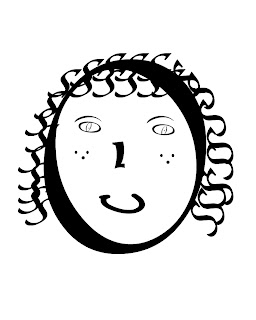
  • I used Photoshop to create a text portrait of myself.
  • I designed this for Digital Design I.
  • I finished this project yesterday, and my inspiration was to try to make it look cartoony but then again real life.
  • My biggest problem was trying to find something on the keyboard to represent a mouth.
  • I think that this picture has me looking like a little kid.